
Every company that adopts Notion goes through the same three phases, and knowing which one you are in is more useful than any feature comparison.
Months one to three. Delight. Someone builds a beautiful company handbook. Meeting notes have templates. There is a roadmap database with four views and it is genuinely good.
Months four to twelve. Sprawl. Everyone makes pages. Nobody deletes any. There are three onboarding documents and the newest one is not the best one.
Year two. Search failure. Someone asks where the expenses policy is and four people give four different links. Two are stale.
Phase three is not inevitable, but avoiding it requires a decision nobody makes at purchase time. That is the review; the rest is detail.
Why it is worth the trouble
Notion's model — every page can be a database, every database row is a page, every view is a lens on the same data — remains the most flexible content model available at this price. A single roadmap database can be a board for the delivery team, a calendar for marketing and a filtered list for the executive, with no synchronisation because there is nothing to synchronise.
And it is pleasant to write in. That sounds soft; it is the reason documentation actually gets written. Confluence is more rigorous and people avoid it. A wiki nobody updates is worth less than a messy one everybody uses.
The tiers, and where the lines fall
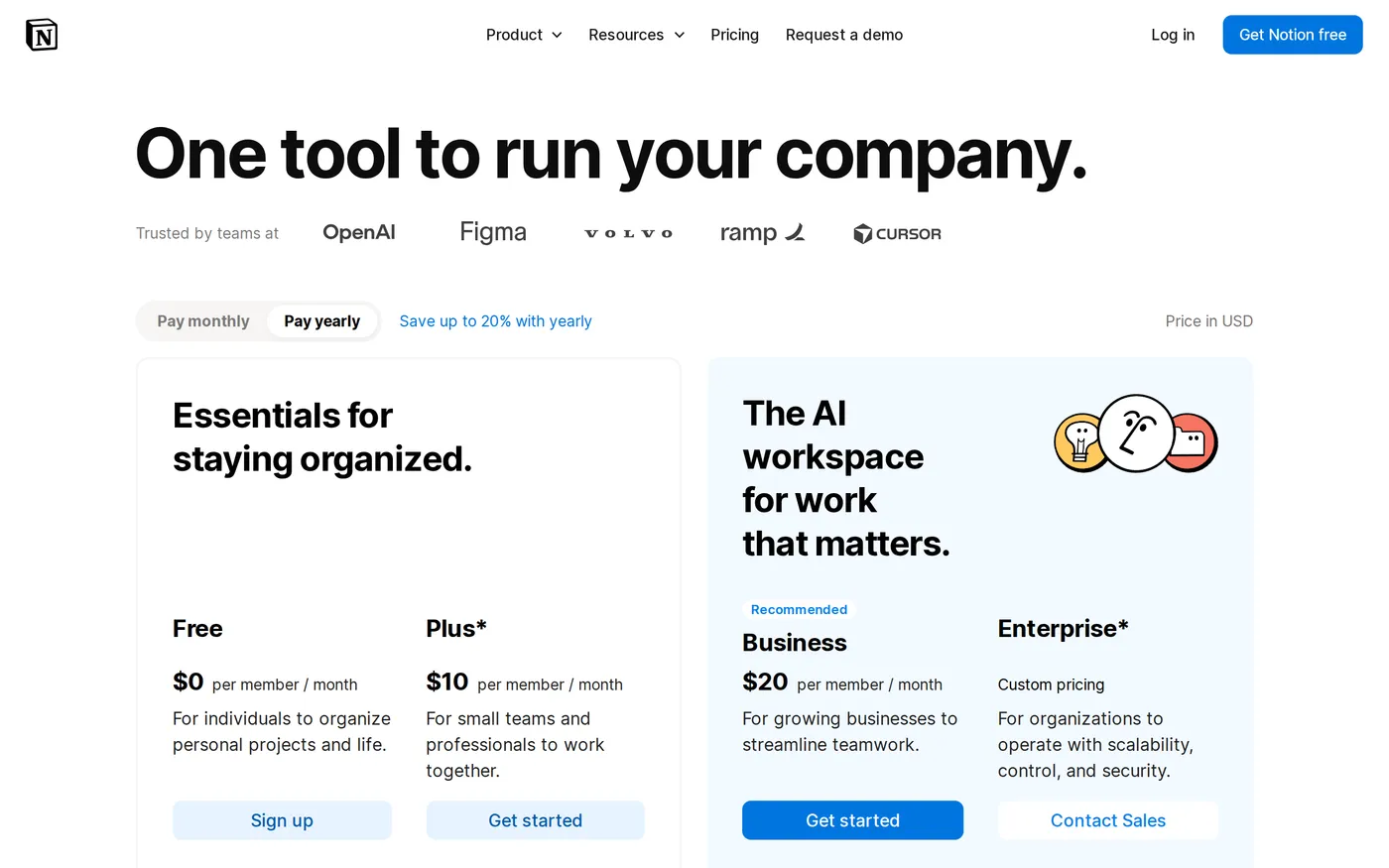
Free — personal use. Files capped at 5MB each, page history kept 7 days, up to 10 guests, a trial allowance of Notion AI.
Plus —
$10per member per month. Unlimited file uploads, 30-day page history, unlimited guests, custom forms and sites.Business —
$20per member per month. Notion Agent, AI meeting notes, enterprise search, SAML SSO, granular database permissions, private teamspaces.Enterprise — custom. Zero data retention with LLM providers, SCIM, audit logs, advanced security, a customer success manager.
Two free-tier limits deserve emphasis because they bite quietly. The 5MB upload cap rules out most PDFs and any video. The 7-day page history means a bad edit on day eight is permanent — and in a tool where anybody can restructure anybody's page, that is a real risk rather than a theoretical one.
Guests, and why Plus is the practical floor
Free allows ten guests. Plus allows unlimited. If you work with contractors, agencies or clients, that single difference decides the tier for you, and ten dollars a member is a reasonable price for not having to audit a guest list.
The Business tier is about finding things
Business at $20 adds several things, and the honest ranking of them is: enterprise search first, everything else second.
Notion's standard search is its weakest component. In a workspace of a few hundred pages it is fine. At several thousand it returns too many results ranked by something close to recency, and the page you want is the one written eighteen months ago with a title nobody would guess. Enterprise search — which reaches across connected tools as well — is a meaningful improvement and the reason a growing company ends up on Business.
Paying twice as much per seat to make your own documentation findable is a strange proposition, and it is also the correct decision once a workspace passes a few thousand pages.
The AI meeting notes are good. Notion Agent, which takes multi-step actions across the workspace, is the feature with the widest gap between demo and daily use — impressive when the task matches its shape, and quietly wrong in ways you have to check when it does not.
Performance and export
Large relational databases are slow. A database with several thousand rows, a handful of relations and a rollup or two takes seconds to load a view. For a documentation tool this is tolerable; teams that push Notion toward being an operational system of record hit it constantly and should read that as a signal.
Export is the other thing to understand before you commit. Notion exports Markdown, HTML and CSV. Pages survive. Databases come out as CSV files, which means the relations, rollups, formulas and views — the actual work — do not travel. There is no lock-in clause anywhere in the contract; the lock-in is that the structure is not portable.
The one thing to do on day one
Name an owner. One person responsible for the top-level structure, with the authority to archive things. Give them an hour a month. Every company that is still happy with Notion in year three did this, and almost every company that abandoned it did not.
Verdict
8.6. Notion is the best product in its category and the one whose value depends most on a decision that has nothing to do with the software.
Start on Plus at $10. Move to Business when search stops working, which you will notice without being told. Appoint the owner before either. Current plans are on Notion's pricing page.
Softmarque is not paid by the products it reviews. Prices and plan names were taken from the vendor’s own pricing page on the date shown above and change often; nothing here is financial, legal or accounting advice.